
How to store value of K coins in National Karaoke ? "K-Sing for All" is a karaoke software produced by Tencent. It has intelligent scoring, professional mixing, friend stage, fun interaction and social sharing functions. On September 10, 2014, the iOS version of National Karaoke was first released on the app store and was well received after its launch. Since it is produced by Tencent, the payment methods are indispensable such as QQ wallet, WeChat payment, etc. Now let’s talk about how to store K coins in National Karaoke in detail.
1. First open the comprehensive karaoke official website: http://kg.qq.com/ , after entering the website, As shown in Figure 1 , click Login and scan the QR code on the mobile app to log in to your account. ;

Figure 1
2. After successful login, you will automatically enter the personal center. As shown in Figure 2 , you will see the words "Top-Up", and a pop-up will appear after clicking National karaoke k currency recharge interface ;

Figure 2
3. After entering the K-coin deposit interface of National Karaoke, As shown in Figure 3 , select the corresponding denomination according to your needs and then deposit the value immediately below to enter the payment page. ;
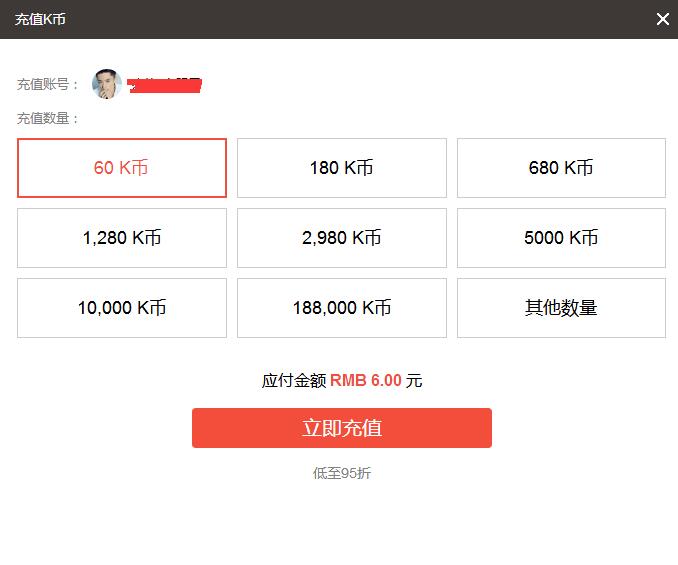
Figure 3
4. After entering the K-coin recharge payment page of National Karaoke, As shown in Figure 4 , we can see that the payment methods include WeChat payment, online banking payment, QQ wallet and Q coin payment. Among them, WeChat payment and QQ wallet payment can enjoy a 50% discount. You can choose your own convenient payment method to complete the payment. At this point, the K-coin recharge of National Karaoke has been successfully completed.
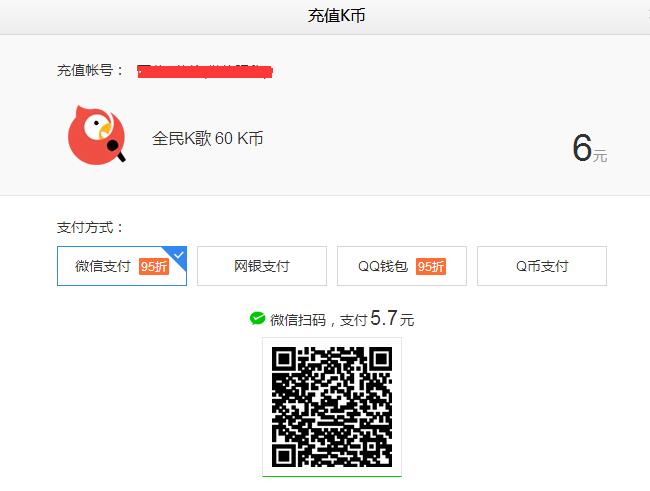
Figure 4
Original Address:https://www.idouchong.com/en/czgl/207.html Please keep the source when reprinting!