
How to recharge in Clash Royale on iOS ? The gamer friends who asked this question basically don’t know much about the recharging of Apple games. In fact, the iOS recharging method of Clash Royale is the same as most games in the Apple Store. They require built-in purchases. The so-called built-in purchases are to purchase gems in the game after recharging the value to the Apple account. The editor below will briefly introduce the recharge process of iOS Clash Royale.
first step: Top up your Apple account first
domestic: Domestic users can recharge directly in the Apple App Store. Domestic bank cards and credit card payments are supported, as well as WeChat, Alipay and other payment methods, as shown in the figure below.:
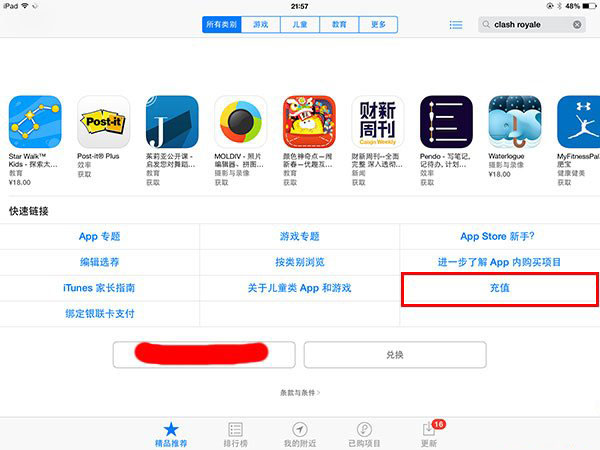
After entering the Apple Store, scroll down
foreign: Foreign users cannot store value directly in the Apple store and can only choose to store on behalf of their customers. They can choose to use the 94LIVES Overseas Card Network overseas store to store value on their Apple account in China, and they can directly pay with foreign bank cards and credit cards.
Step 2: Return to the game to purchase gems
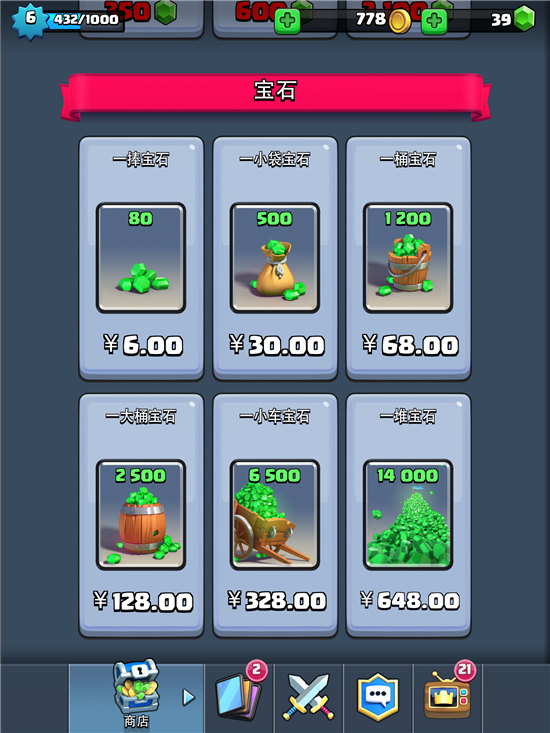
Royal Clash game recharge interface
After the Apple account is recharged, you can return to the game to recharge Clash Royale. You can directly select gems to purchase in the game store, and then pay with the money in your Apple account.
The above content is to introduce to you how to recharge the value of Clash Royale on iOS. The iOS side is quite special. There is an extra link in the middle. You must first recharge the Apple account, and when recharging the Apple account, you will also score points at home and abroad. There is nothing else. I wish you all a happy work!
Original Address:https://www.idouchong.com/en/czgl/259.html Please keep the source when reprinting!