
How to store diamonds on Douyin official website ? This is very simple, the steps are as follows:
1.Open Douyin recharge Official website link: https://www.douyin.com/falcon/webcast_openpc/pages/douyin_recharge/index.html ;
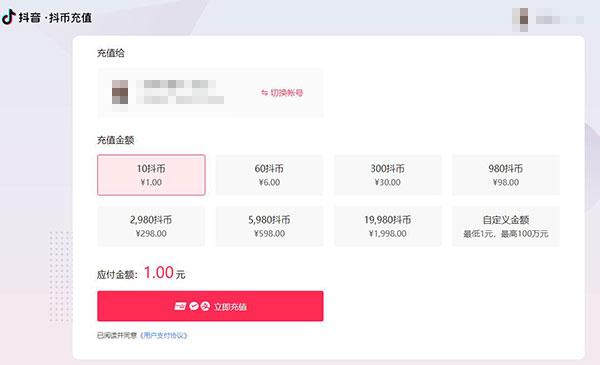
2. Open Douyin App, click Search in the upper right corner, then click Scan, scan the QR code on the web page to log in ;
3. Select the amount of recharge. Douyin’s official website provides 10 diamonds, 60 diamonds, 300 diamonds, 980 diamonds, 2980 diamonds, 5980 diamonds, 19980 diamonds and a customizable amount. ;
4. Select the payment method. Douyin’s official website provides three payment methods: corporate online banking payment, Alipay payment and WeChat payment. Just select one payment method to complete the payment. ;
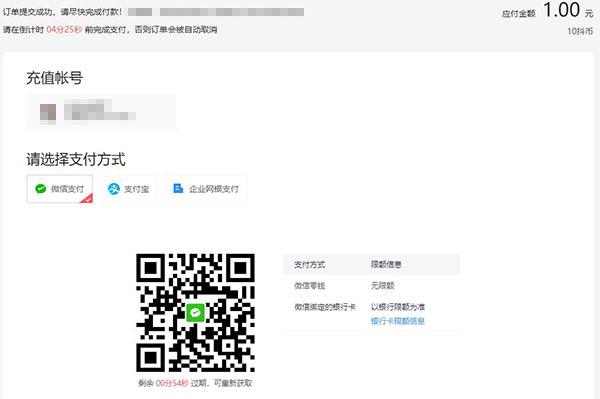
However, some users will encounter a situation where they do not have the above three payment methods, so how to store Douyin diamonds?
Users who don’t have these three payment methods don’t have to worry, we’ll find one Douyin Diamond Reserve The platform can help us recharge Douyin diamonds. However, there are currently many pages pretending to recharge Douyin’s official website. Everyone must be careful and guard against being deceived. Let’s talk about how to use a third-party platform. Douyin storage How to operate, we take 94LIVES as an example, the specific steps are as follows:
1. Open 94LIVES Douyin Diamond Online Top-Up Web Page Link Entrance : https://www.idouchong.com/en/douyin/ ; (Non-Douyin official recharge entrance)
2. Select the denomination you want to store value, provided by 94LIVES Douyin Diamond Top-Up The face value is consistent with the face value of Douyin’s official recharge, because 94LIVES Douyin Diamond Reserve The service uses the direct deposit portal of Douyin’s official website, not a third-party agent to deposit value. ;
3. After confirming the face value and quantity, click "Buy Now"” ;
4. Enter the order details page (non-94LIVES registered users will enter the 94LIVES login page at this time. If you don’t have an account, we can just register an account. If you already have a 94LIVES account, you can log in directly) ;
5. Fill in the Douyin account you want to recharge. Be sure to fill in the Douyin account you want to recharge accurately. ;
6. Select a payment method and complete the payment. 94LIVES supports global mainstream payment methods. ;
7. After the payment is successful, wait for 94LIVES to help you store Douyin diamonds ;
8. You can go to the 94LIVES user center to check the order completion status, or directly open the Douyin App on your mobile phone to check the Douyin diamond arrival status.
special statement: The Douyin diamond recharge service provided by 94LIVES is a third-party storage service and is not Douyin official recharge website, but 94LIVES’s Douyin Diamond deposit channel is also Douyin’s official direct deposit, so you don’t have to worry about being blocked, and the direct deposit from the Douyin Diamond official website will be credited to your account in seconds. If you have any questions, you can contact 94LIVES’s online customer service.
Original Address:https://www.idouchong.com/en/douyin/545.html Please keep the source when reprinting!