
Introduction: Why You Need a Clear Recharge Guide
In today's thriving live streaming social ecosystem, SuperLive attracts millions of users with its powerful interactivity and global community. Whether you want to send an encouraging "Little Star" to your favorite streamer or light up the chat with a gorgeous "Super Rocket," it all revolves around the platform's core virtual currency—SuperLive Coins. However, for many new users and even some veterans, how to obtain Coins efficiently, safely, and cost-effectively remains a confusing challenge. The official in-app purchase process is simple but fixed in price, while the internet is flooded with various information and channels, making it hard to choose. This article aims to be your most comprehensive and clearest SuperLive Coins recharge encyclopedia for 2026, guiding you from scratch through the entire process and revealing smarter spending options.
Chapter 1: Understanding SuperLive and Its "Power Source"—Coins
Before ping into recharge details, it's essential to understand the value of SuperLive and Coins.
-
What is SuperLive?
SuperLive is a mobile application focused on real-time video live streaming and social interaction. It goes beyond traditional one-way viewing, building a virtual social space centered on streamers with deep user participation. Here, users can:
-
Watch talent shows, life sharing, and game streams from broadcasters worldwide.
-
Interact with streamers and other viewers through live comments and likes.
-
Directly express affection and support for streamers by sending virtual gifts, which translates in real-time into the streamer's earnings and ranking.
-
-
What are SuperLive Coins? Why are they Essential?
SuperLive Coins are the only universal premium virtual currency within the platform. Think of them as the "fuel" or "power source" driving the entire SuperLive interactive ecosystem. They have no fiat currency value and cannot be withdrawn, but their role within the platform is crucial:
-
Purchasing Virtual Gifts: All gifts, from basic "Tiny Hearts" and "Applause" to cool "BMW Cars" and "Spaceships," require spending a specific number of Coins.
-
Increasing Interaction Level: Sending gifts increases your intimacy score in that streamer's room, boosting your fan badge level and unlocking exclusive badges and privileges.
-
Unlocking Premium Features: Certain special entrance effects, comment borders, or private chat features may require Coins or a certain spending level.
-
Supporting Streamer Growth: The Coins you spend are a primary source of income for streamers, directly supporting their creative work.
-
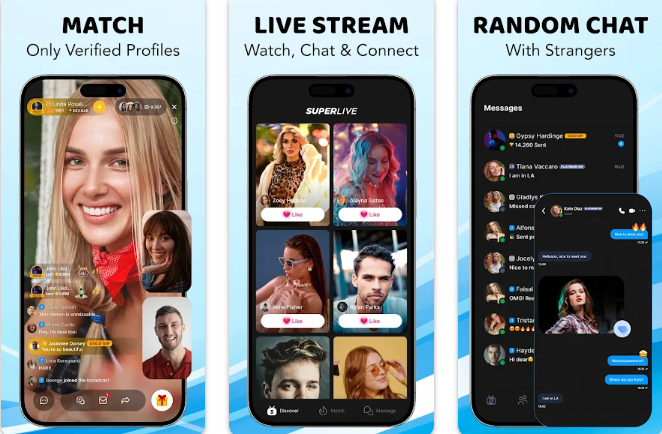
In short, without Coins, your interactive experience on SuperLive remains at the "viewing" level; with Coins, you can participate deeply and enjoy the full immersive social experience.
Chapter 2: Key Preparation Before Recharge—Finding Your UID
No matter which channel you use, one piece of information is absolutely essential and unique: your SuperLive User ID (UID). This is a 7-10 digit number, your unique identity on the platform. Providing the wrong UID will send Coins to another account, usually irreversibly.
How to Find Your UID (2026 Latest Interface)?
-
Open the SuperLive app on your phone and log into your account.
-
Tap the "Me" or "Profile" icon in the bottom right corner to enter your personal homepage.
-
Below your avatar and username, you will clearly see a line labeled "UID: " followed by a number string. E.g.,
UID: 1234567890. -
(Highly Recommended) Immediately take a screenshot or long-press to copy the number. During the subsequent recharge process, double-check carefully or paste it directly to avoid manual entry errors.
Chapter 3: The Official Standard Recharge Process (In-App Purchase)
This is the most direct and basic method, suitable for first-time users, those with extremely high security concerns, and users who don't mind the price.
Steps:
-
Navigate to Recharge Page: Inside the SuperLive app, tap the "Recharge" or "Buy Coins" button on your profile page or next to the gift box icon in a live room.
-
Select a Package: A list of packages will pop up, showing fixed denominations from 605 Coins to 100,000 Coins. Prices are displayed in your local currency (USD, EUR, IDR, etc.).
-
Choose Payment Method: After tapping your desired package, the system will invoke the Apple Pay (iOS) or Google Pay (Android) interface. You can also choose a bound credit/debit card.
-
Complete Payment: Confirm the payment via biometrics (fingerprint/face) or password.
-
Instant Delivery: Upon successful payment, Coins are immediately added to your account balance. You can check this in "Wallet" or "My Coins".
Pros: Integrated process, secure and convenient, instant delivery.
Cons: Typically the highest price, as it includes approximately 15%-30% channel commissions from the Apple App Store or Google Play Store. Payment methods are limited to the platform's ecosystem.
Chapter 4: A Better Choice—Recharging via Authorized Third-Party Platforms (Using 94LIVES as an Example)
For users seeking better value, more payment options (especially localized ones), authorized and legitimate third-party recharge platforms are an ideal choice. They source Coins in bulk directly from SuperLive or its distributors and retail them to users at more favorable prices. Here, we use the well-regarded 94LIVES as an example to illustrate the process.
Why Choose a Platform Like 94LIVES?
-
Significant Price Advantage: Bypasses app store commissions, often allowing you to get 10%-30% more Coins for the same amount of money.
-
perse Payment Methods: Supports credit cards, PayPal, and dozens of local e-wallets worldwide (e.g., GrabPay, OVO, DANA in Southeast Asia, PIX in Brazil).
-
Frequent Promotions: Often offers "bonus coins," "discount coupons," etc., further increasing value.
-
Reliable Delivery Speed: Automated system processing, usually completed within minutes, with order tracking.
Detailed Steps to Recharge on 94LIVES:
-
Access the Platform: Visit the official 94LIVES website via your browser.
-
Search for Product: In the website search bar, enter "SuperLive" or "SuperLive Coins" to find the relevant product page.
-
Select Package: Browse and choose the Coins package you need. The page clearly shows the price, savings, and total Coins for each package.
-
Enter Information:
-
On the order page, accurately enter or paste your previously noted SuperLive UID.
-
(Crucial) Double-check the UID is correct.
-
-
Choose Payment: Select your most convenient method from credit cards, PayPal, local e-wallets, and more.
-
Complete Payment: Follow the payment gateway instructions to finalize the payment.
-
Wait and Confirm Delivery:
-
After successful payment, the page will show "Processing." Typically within 1-5 minutes, the Coins will be credited to your SuperLive account.
-
You can keep the 94LIVES order page open or open the SuperLive app later to confirm the balance increase in your wallet.
-
94LIVES usually sends an order receipt via email, and you can also check your order status on the website.
-
Important Note: Ensure you are visiting the official 94LIVES website. Beware of imitation sites. Legitimate platforms like 94LIVES will never ask for your account password, SMS verification code, or other sensitive information—only your UID.
Chapter 5: After Recharge—Verification, Usage, and Notes
-
How to Verify Delivery?
-
The most direct way is to return to the SuperLive app and check if your Coins balance has increased on your profile page.
-
Check your inbox or system messages for a successful recharge notification.
-
Check the status in "My Orders" on 94LIVES to see if it's marked "Completed."
-
-
What if Coins Haven't Arrived?
-
First, Be Patient: During off-peak hours, processing might take 5-15 minutes.
-
Check the UID: Confirm the entered UID is completely correct.
-
Contact Customer Support: If it's been over 30 minutes, immediately contact 94LIVES online support with your order number. They can usually quickly locate and resolve the issue.
-
-
Usage Tips:
-
Test with a Small Amount: When using a new platform for the first time, consider buying the smallest package to test the process and delivery speed.
-
Watch for Promotions: Around major holidays (Christmas, New Year) or platform anniversaries, platforms like 94LIVES often launch limited-time discounts, a great time to stock up on Coins.
-
Spend Responsibly: Set an entertainment budget. Enjoy the interactive fun of supporting your favorite streamers while maintaining rational spending.
-
Conclusion
Mastering how to recharge SuperLive Coins is the first step to enjoying this exciting live streaming world. Through this tutorial, you've learned not only the official standard process but also discovered excellent alternatives like 94LIVES that can save you money and offer convenience. Whether you're a new viewer occasionally sending a token of appreciation or a seasoned fan aspiring to shine on the leaderboards, you can now recharge confidently and wisely, transforming your support into the most enthusiastic cheers in the live room. Start your deep interactive journey on SuperLive today!










- 2026-04-22
- SuperLive Coins Price Analysis 2026: In-Depth Comparison of O
Click to viewIn the virtual economy of SuperLive, every Coin is a key to interacting with your favorite streamers and unlocking unique experiences. However, faced with a plethora of fixed packages in the official app store and a myriad of complex rechar...
- 2026-04-22
- Ultimate SuperLive Recharge Tutorial (2026): A Step-by-Step G
Click to viewIntroduction: Why You Need a Clear Recharge Guide In todays thriving live streaming social ecosystem, SuperLive attracts millions of users with its powerful interactivity and global community. Whether you want to send an encouraging Little...
- 2026-04-22
- Complete Guide to SuperLive Coins Recharge 2026: From Beginne
Click to viewSuperLive is a globally popular video live streaming social application developed and operated by Superlive Tech. With over 10 million downloads on Google Play and Apple App Store and a high rating of 4.6 stars, this app has become an essen...
- 2026-04-22
- SuperLive Recharge vs In-App Purchase: Which Is Better for Bu
Click to viewOnline recharge for SuperLive is typically cheaper and more flexible than in-app purchases, but the prerequisite is choosing a reliable platform. 1. Comparison of Two Recharge Methods Method Advantages Disadvantages In-App Purchase Official...
- 2026-04-22
- How to Buy SuperLive Coins Online Safely (2026 Guide for Fast
Click to viewThe safest and fastest way to buy SuperLive Coins is to choose a platform that supports instant delivery and multiple payment methods, such as 94LIVES, which can effectively avoid delays and account risks. What are SuperLive Coins? SuperLiv...