
How to scan the QR code to store Genshin Impact Creation Crystal overseas ? The Creation Crystal is a prop in the Genshin game. The Creation Crystal can be exchanged for raw stones at a ratio of 1:1. You can use the raw stones to draw cards in the game to obtain characters and equipment. Currently, the only way to obtain the Creation Crystal is to store value. So how do you store the Creation Crystal of Genshin Impact overseas? How do you scan the code to deposit Genshin Impact?
Scan the QR code on 94LIVES to pay for Genshin Impact’s Creation Crystal. The steps are as follows::
1.Open 94LIVES official website , register an account for free ;
2.Open Genshen acting reserve Product link: https://www.idouchong.com/en/yuanshen/ ;
3. Determine the face value and purchase quantity and click to buy now ;
4. Fill in the Genshin Impact account to be recharged and select the payment method and click Submit Order ;
5. Complete payment ;
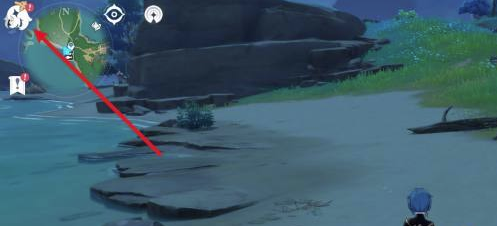
6. Enter the Genshin Impact game interface and click on the Paimon option in the upper left corner. ;
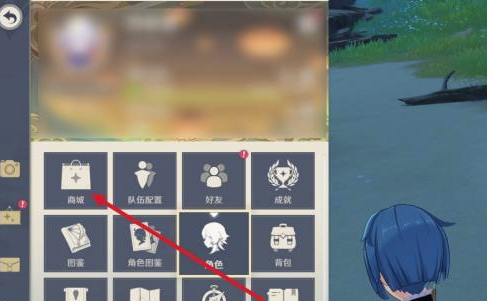
7. Select "Mall" in the pop-up interface.” ;
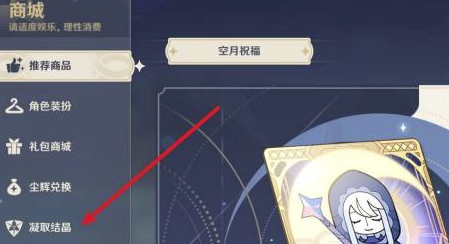
8. Select "Crystallization" in the pop-up interface.” ;
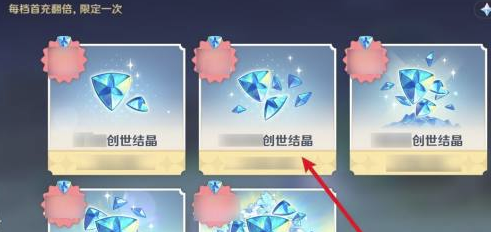
9. Select the number of Creation Crystals to be stored based on the face value you just selected on 94LIVES. ;
10. Contact 94LIVES website customer service to confirm the payment method, choose to scan the QR code to pay and send a screenshot to customer service ;
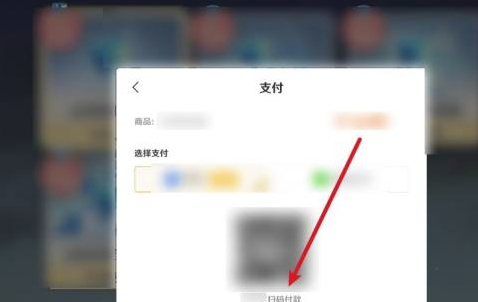
11.94LIVES customer service scan the QR code to help you complete Genshin Impact top-up.
Original Address:https://www.idouchong.com/en/yuanshen/538.html Please keep the source when reprinting!