
Some netizens asked: Can Genshin Impact be stored online? ? 94LIVES clearly tells everyone, Genshin Impact can store value on the web . Moreover, there are two ways to store value on the Genshin Impact website for everyone to choose from. These two methods are mainly divided according to regions. The following will introduce the two methods in detail, so you can choose according to your needs.
Genshin Impact webpage top-up method 1: Genshin Impact official website web direct storage
Usage environment: Domestic users ( Only supports Alipay payment )
Genshin Impact official website web direct storage process:
1. Open the direct storage link on the official website of Genshin Impact: https://webstatic.mihoyo.com/payment/yuanshen/index.html ;
2. Log in to your Genshin Impact account ;
3. Click the "Start Recharging" button ;
4. Select the item you want to store value, such as: Pearl Journey, Sky Moon Blessing, Creation Crystal ;
5. Click to buy, a QR code will pop up, use Alipay on your mobile phone to scan the code to pay and your account will be credited.
Notes on Direct Deposits on Genshin Impact’s Official Website:
1. The Creation Crystals stored on the Genshin Impact official website are regular Creation Crystals (not PlayStation Creation Crystals) and can only be obtained and used by logging in to the PC or mobile terminal. ;
2.Only supports Alipay payment ;
3. Please refer to the in-game "Mall - Crystallization" interface for the double rebate status of your first deposit.
Genshin Impact web page top-up method 2: Genshin Impact 94LIVES web recharge
Usage environment: Overseas users ( Mainly serving groups who want to use foreign payment methods )
Genshin Impact 94LIVES webpage recharge process:
1. Open the value-added link of the Genshin Impact webpage on the 94LIVES website: https://www.idouchong.com/en/yuanshen/ ;
2. Click the Go to Buy button ;
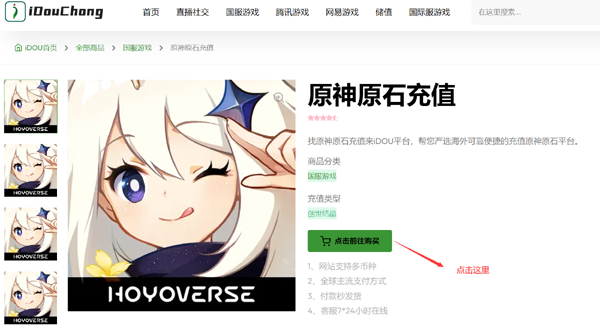
3. Select the denomination and quantity to be stored ;
4. Click the Buy Now button ;
5. Select payment method ;
6. Complete payment ;
8. After the payment is completed, contact the platform customer service to complete the recharge for you.
Notes on recharging value on Genshin Impact website:
1. If you are using the Genshin Impact official website account to log in, please contact the platform’s online customer service to provide the required information in order to quickly recharge successfully. ;
2. If you are using an Apple ID to log in, it is recommended that you recharge your Apple account balance ( Click here: Apple direct storage in China ) ;
3. Under normal circumstances, the account can be received within 1-2 minutes. If the account is not received within 5 minutes, please contact the platform customer service in time for consultation. ;
4. The platform supports multi-currency switching and supports mainstream payment methods in multiple countries.
The above content is all to answer the question "Can Genshin Impact be recharged on the web?" If you have any questions, you can directly consult the website customer service online.
Original Address:https://www.idouchong.com/en/yuanshen/645.html Please keep the source when reprinting!