
How to save money in apple id ? In fact, it is not difficult at all. Now Apple has opened many payment channels. Today we will talk in detail about how to save money in Apple ID.
How to save money in Apple ID? The first step is to open the App Store on your phone and drag it all the way to the bottom, as shown in Figure 1.:
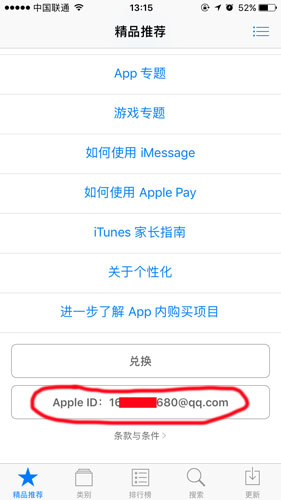
Figure 1
The second step is to click on the red area marked in Figure 1 and enter your Apple ID account. ;
The third step is to click on your Apple ID account, and click View Apple ID in the pop-up dialog box, as shown in Figure 2.:
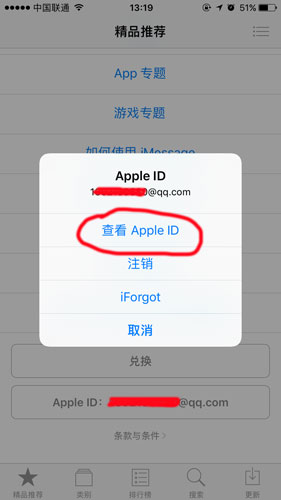
Figure 2
Step 4: After clicking View Apple ID, enter the password for verification, and then click Recharge, as shown in Figure 3.:
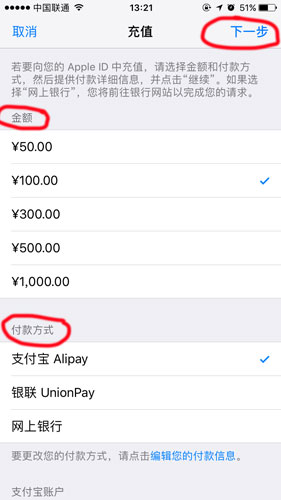
Figure 3
Step 5: Select the recharge amount, choose Alipay to pay, and click Next, as shown in Figure 4:

Figure 4
Step 6: Return to the recharge success page and the recharge is successful.
So how do friends overseas save money in their Apple ID? It’s actually very simple. Friends who don’t understand can read this article first.












- 2025-12-17
- Which is better to recharge iTunes platform?
Click to viewtop-up itunes Which platform is good? I have previously written two articles on which overseas recharge platforms are good and what are the types of overseas recharge platforms......
- 2024-08-27
- How to recharge foreign Apple IDs
Click to viewHow to store value on foreign Apple ID? Foreign Apple ID accounts are restricted and can only be bound to domestic bank cards, so you cannot directly recharge using domestic bank cards. ...
- 2024-08-27
- How to recharge overseas Apple ID
Click to viewHow to recharge overseas Apple ID? Many Apple users have reported this problem. Due to Apple policy restrictions, Apple users in many countries can only recharge local Apple accounts and cannot recharge Apple accounts in other countries. ...
- 2024-08-27
- How to operate Apple mobile game storage in South Korea
Click to viewHow does Korean Apple mobile game storage work? You have to let an experienced driver answer this question. Generally, people who ask this question are Chinese in South Korea, because you cannot use Korean won to recharge your Apple account ...
- 2024-08-27
- How can I recharge my Apple ID abroad?
Click to viewHow can I recharge my Apple ID abroad? Users who use Apple mobile phones all know that paid apps in the Apple Store must be purchased or recharged through the Apple ID. Once there is no money in the Apple ID ...